
PURPOSE IN EVERY PHOTO
Know the next shot before you take it.
Give every rep a clear path through the inspection. Required-shot prompts, elevation labels and damage controls help the crew capture the details your office needs to build the report.
14-day trial · Card required · 2-seat minimum
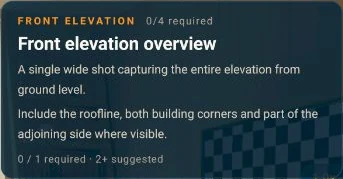
- Required-shot prompts and a walkthrough checklist
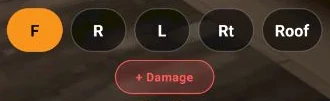
- Elevation labels that stay with the evidence
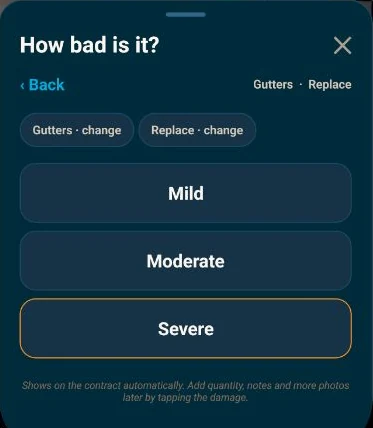
- Component, action and severity captured together
FOLLOW THE SHOT LIST
Give every inspection a consistent starting point.
The guided camera names the next required shot and explains what to include. Work through overviews, gutters, flashing, damage and test squares with the remaining photos in view.
Move between sections to match the work on the property. The walkthrough keeps your place and makes it easy to see what still needs attention.
SAVE THE CONTEXT
Capture where it is and what needs work.
Choose Front, Rear, Left, Right or Roof as you capture. The office gets elevation context with the photo, making it easier to follow the inspection.
Record the damaged component, choose Repair or Replace, and set severity. Add quantities, units, rates, notes and linked photos in the fuller damage editor as the scope takes shape.
FIELD WORK, THEN REVIEW
Keep the crew moving. Bring the office into the details.
Once you have signed in and prepared the app, inspection work and photos can save locally through a coverage gap and queue for sync.
The office opens the same inspection on a larger screen to review photos and refine damage details. Field capture becomes the starting point for a clear, organized report.
See what remains
Required-shot prompts and the walkthrough checklist keep the crew on track.
Refine the scope
Reviewers can adjust damage details and keep the supporting photos connected.
What makes the camera guided?
The walkthrough shows the next required shot, with prompts for overviews, gutters, flashing, damage and test squares. Reps can move between sections and check what remains while they work.
See the guided cameraHow are damage details recorded?
Choose the component, such as roof, siding or gutters, then Repair or Replace and a severity. The fuller damage editor supports quantities, units, rates, notes and linked photos. Your team can review and adjust those details.
Can an inspection continue offline?
The mobile app can save inspection work, photos, damage details and walkthrough progress locally and queue them for sync. Sign in and prepare the app while connected first. Server-generated reports, roof measurements and other live services still need internet access.
BUILT FOR ROOFING COMPANIES
Bring the next job into HailSeek.
Start a 14-day company trial. Card required. Teams has a 2-seat minimum.